INPUT
Can this content be sent to AI?Its classification needs to be checked.PREFLIGHT BEFORE AI · MIT · LOCAL-FIRST
Before it reaches ChatGPT,
it stops on your machine.
Inspect the files and text you are about to send to ChatGPT, Claude or Gemini — without anything leaving the device. The verdict, the reason and what was covered come back on the spot.
- 0.19sinspection, measured
- 0external requests
- 0.30recall, published
- MITruns locally
Developer preview. Demo mode does not send to an external AI. Real use requires integration into a managed send path.
SCREEN RECORDING OF THE REAL APPDEMO / SYNTHETIC SAMPLE
Read the recording as text
- A confidential draft is about to be pasted into an AI
- It is inspected on this machine before it is sent
- Review. Nothing was sent (inspection took 0.19s, real time)
- The reason, the rule and what was covered are shown
- The verdict is kept as JSON on the device
A screen recording of the real app, using a synthetic sample, with no speed-up and no shortened waits.
SIGNATURE MOMENT / PREFLIGHT
Decide before delivery.
Synthetic example, calculated by the bundled rule engine.
CHECK
Match policy and classificationInspect the restricted-data boundary.PG-002 / BLOCK
This send is blockedConfidential or restricted classification.01 / CHECK
Check before sending.
Evaluate content against the registered destination, action and trusted data classification.
02 / REASON
Know why it stopped.
Show the rule and the known facts instead of collapsing everything into a generic risk score.
EV-101 / PREFLIGHTBLOCK
External send of customer data blocked
Confidential or restricted classification. This external send path is refused.
- Action
- ai.prompt
- Data class
- confidential
- Rule
- PG-002
not_executed03 / TRACE
Review what happened.
Separate inspected-only, unknown-delivery and demo-received states so the history does not overclaim.
REAL RULE OUTPUT
Four examples,
from the actual rules.
Confidential, unknown, public and delete actions. These states are generated from synthetic inputs by the bundled Python guard.
BlockReviewAllow
EV-101 / PREFLIGHTBlock
External send of customer data blocked
Why
Confidential or restricted classification. This external send path is refused.
Technical basis
- Action
- ai.prompt
- Data class
- confidential
- Rule
- PG-002
Inspection only · transport not executed not_executed
EV-102 / PREFLIGHTReview
Hold until classification is known
Why
The data classification has not been verified. The action is held rather than assumed safe.
Technical basis
- Action
- ai.prompt
- Data class
- unknown
- Rule
- PG-004
Inspection only · transport not executed not_executed
EV-103 / PREFLIGHTAllow
Public content passes the policy check
Why
It matches the registered policy. This is not a guarantee of safety.
Technical basis
- Action
- ai.prompt
- Data class
- public
- Rule
- —
Inspection only · transport not executed not_executed
EV-104 / PREFLIGHTReview
Delete requires a separate approval path
Why
Execute, delete, share and send actions require a separately authenticated approval path.
Technical basis
- Action
- agent.delete
- Data class
- public
- Rule
- PG-005
Inspection only · transport not executed not_executed
No real data is inspected or sent by this public page. View sample decisions ↗
THE ACTUAL WORKBENCH
One screen,
from check to history.
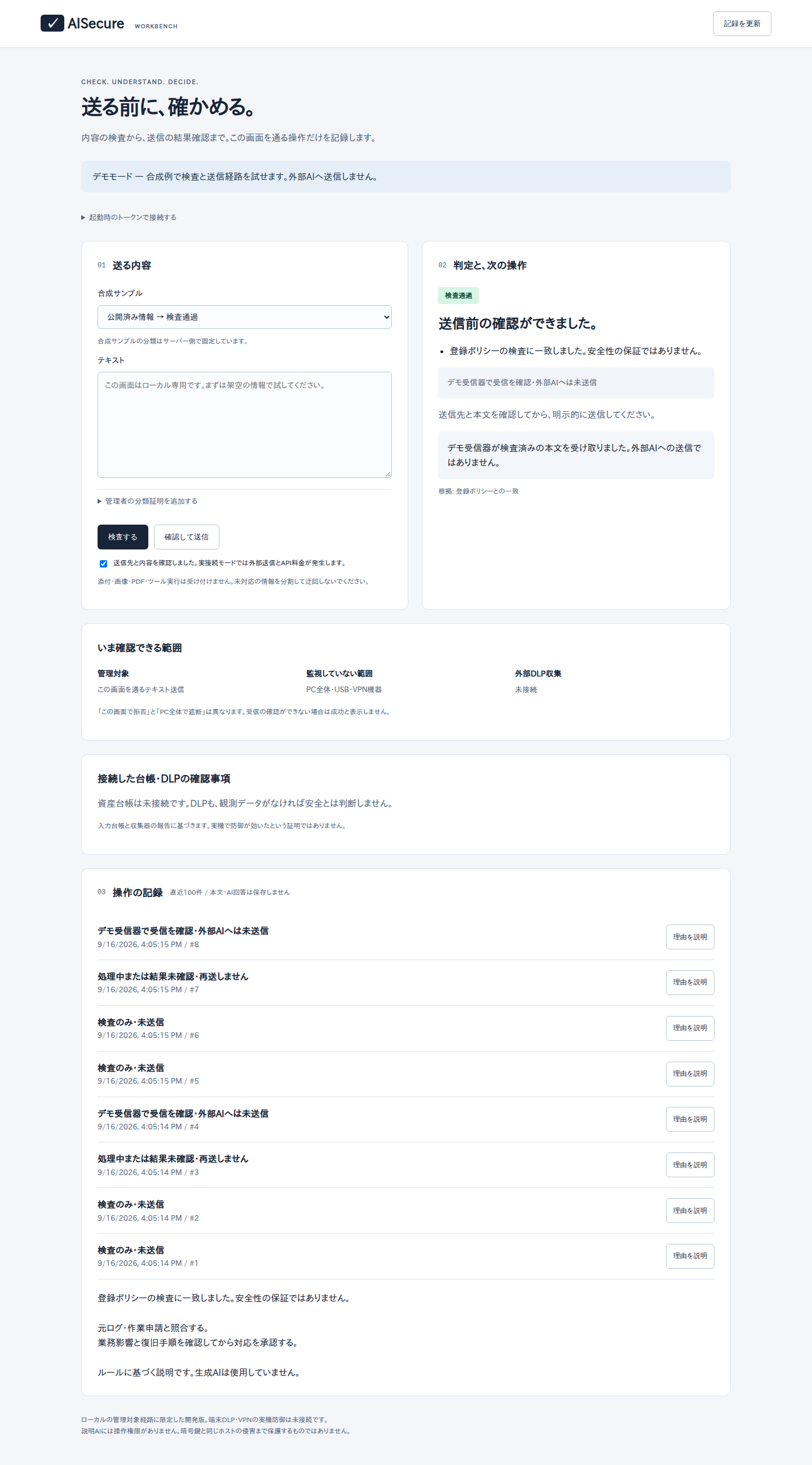
Inspect the send, read the reason, see the monitored scope and review the operation history. Demo mode stays local and does not send to an external AI.
Start the workbench →MEASURED / NOT CLAIMED
We publish what it
fails to detect.
We could not find another tool in this space that publishes a detection rate. We measured ours against our own corpus and put the weak parts first.
What this number does not mean
It is measured on a synthetic 60-case corpus (40 positive, 20 negative). It is not a miss rate on real business documents, and deliberate evasion such as a zero-width character is out of scope.
Full measurement and corpus ↗ · What it is designed to stop ↗
SCOPE / NO OVERCLAIMS
What is covered,
and what is not yet verified.
AISecure is a developer preview for managed preflight checks and reviewable records. It does not replace an organization-wide security program.
Implementation boundary ↗Covered today
- Rule-based text-send preflight decisions
- Decision reasons and rule IDs
- Operation history and delivery state
- Synthetic demo receiver verification
Not yet verified
- Complete detection of all sensitive information
- Endpoint-wide DLP, USB or other-process control
- Production VPN remediation and containment
- Independent security certification
GET STARTED
Start locally.
The same app as the recording above. A synthetic sample is already in the field, so the first inspection is one click.
git clone https://github.com/FORIFOR/AISecure.git
cd AISecure
python3 -m venv .venv
. .venv/bin/activate
python -m pip install '.[control]'
python -m aisecure.control --demo
GOOD QUESTIONS
Three boundaries worth knowing.
Does installing it protect the whole endpoint or VPN?
No. The managed send path must be integrated. Endpoint DLP and production VPN containment are separate work.
Does a generative model decide what is safe?
The default decision is rule-based. An optional local model can explain facts, but it has no decision or execution authority.
Can I upload real logs to this public site?
No. This public site is for product presentation and synthetic examples. Handle authorized real logs locally.
Business / adoption · AISecure
What do you need to verify
in your AI workflow?
Tell us the system and the problem. Do not send real logs, secrets or credentials.
What a measurement engagement covers, and what it does not ↗
Scope, timing and pricing are confirmed individually. Sending the form creates no contract or charge.